
Seedream 5.0 Pro Blocked You: What "Couldn't Generate. Try Again Later." Actually Means
Short answer: it's a content block, not a server fault. Seedream 5.0 Pro returns the same vague line whether your prompt was rejected before generation or your finished image was rejected after it. The tell is whether generation visibly started. Retrying the identical prompt almost never works.
That second sentence is the whole problem. "Try again later" is what a service says when it's busy. So people try again. And again, at which point they've burned an afternoon on a request that was never going to complete.
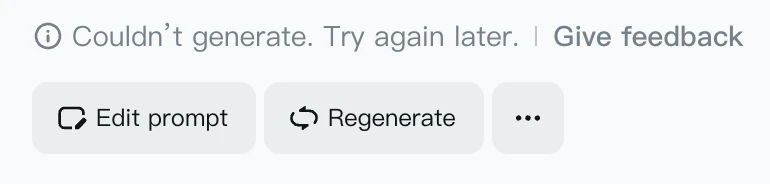
The Two Messages Seedream 5.0 Pro Actually Shows
We ran this on dreamina.capcut.com on July 21, 2026, against two categories: explicit content and copyrighted franchise characters. Across every blocked attempt, Seedream produced exactly two strings.
The first is honest about what happened:
The prompt may contain content that violates our Community Guidelines. Change it and try again.
The second is the one you're probably here for:
Couldn’t generate. Try again later.
Two messages, three different situations. That mismatch is why this is confusing, and it's why reading the message alone won't tell you what to do next.
The Tell: Did Seedream 5.0 Pro Actually Start Generating?
Forget the wording. Watch the progress indicator.
Generation never begins. Your input was rejected up front, before any compute was spent. We saw this consistently when uploading Pikachu and Mickey Mouse reference images: both messages appeared, and the job never entered the queue. Nothing rendered because nothing ran.
Generation starts, runs, then fails. Your input passed. The finished picture didn't. We triggered this by naming Pikachu and Mickey in the prompt with no reference image attached. Dreamina showed its generating state, worked through it, then returned "Couldn't generate. Try again later." The model built your image and a check downstream refused to hand it over.
Same message, opposite causes. One means "your request was refused"; the other means "your result was confiscated." The fix for each is different, which is the practical reason this distinction matters at all.
What Gets Blocked, and What Surprisingly Doesn't
Here's the finding that contradicts most of what's been written about Seedream 5.0 Pro since launch.
Franchise characters are blocked, hard. Pikachu and Mickey Mouse failed by both routes: as a reference upload and as a prompt mention. No wording variation we tried changed the outcome for a directly named character.
Celebrities aren't. Prompts naming public figures generated normally. So did uploads of celebrity reference photos. Several launch-week write-ups claimed Seedream's copyright detection fires on recognisable faces in reference images. In our testing it didn't, not once.
So the line isn't "recognisable people." It's corporate IP. A studio-owned character trips the filter; a famous human doesn't. If you've been rewriting prompts on the assumption that any identifiable face is the problem, you've been solving for the wrong constraint, and you'll keep hitting the wall no matter how carefully you describe the face, because the face was never what the filter was looking at.
Worth knowing if you're weighing models: this is the opposite of how GPT Image 2 behaves, and we broke down both filters side by side in Seedream 5.0 Pro vs GPT Image 2.
Why the Same Message Covers Three Stages
Seedream runs a three-layer content check, documented in APIYI's June 2026 API guide and consistent with what we saw on Dreamina:
- Prompt detection. Scans your text before anything renders.
- Input image detection. Checks reference images in image-to-image work.
- Output image detection. Audits the finished picture before returning it.
On the API side all three collapse into one JSON response: a content_filter code with the message that the output image may contain sensitive information. On Dreamina you get the two consumer strings instead. Either way, the platform never tells you which layer fired.
Readers who know how GPT Image 2's blocks work will spot the family resemblance. OpenAI runs a post-generation similarity classifier that also refuses finished images. The difference is that GPT Image 2 gives you three distinguishable messages mapped to different stages. Seedream gives you one ambiguous line and leaves you to infer the rest from timing.
What Actually Fixes a Seedream 5.0 Pro Block
If generation never started and you got the Community Guidelines message, the text is the problem, and rewriting is the right lever. Drop the proper noun. Describe the thing instead of naming it: a small yellow electric creature with red cheeks rather than the character's name.
If you uploaded a reference image and nothing ran, the image is the problem, not your prompt. Editing the words won't help. Swap the reference.
If generation ran and then failed, rewriting is mostly wasted effort. The output check read the picture, not your sentence, so a cleverer phrasing that still produces the same character produces the same block. Change what you're asking for, or change where you're asking.
Retrying unchanged rarely helps. If two identical attempts both fail, a third won't fix it.
Where You Run It Changes the Answer
This is the part that trips people up when they compare notes and get opposite results.
Dreamina's consumer app, the Volcano Engine and BytePlus APIs, and third-party hosts are separate gates standing in front of the same model. Account tier, region, and per-platform settings all move the line. That's why one person reports Seedream 5.0 Pro as locked down while another calls it permissive, and both are describing their own screen accurately.
Anything you read about "what Seedream allows" is really about what it allowed on one platform, for one account, on one day. Including this post: everything above was measured on Dreamina.
On VidCella, Seedream 5.0 Pro has no daily allowance, and a blocked generation never costs you credits, which matters more than it sounds when Dreamina's free daily allowance is being eaten by requests that were refused before they ever ran. Credits are pay-as-you-go and don't expire.
FAQ
What does "Couldn't generate. Try again later." mean? A content filter blocked the request. The message is the same whether your input was rejected before generation or your finished image was rejected after it.
How do I tell which filter caught me? Watch whether generation visibly starts. Never started means the prompt or the reference image was rejected. Started and then failed means the output was rejected.
Does Seedream 5.0 Pro block celebrity images? Not in our July 2026 Dreamina testing. Prompts naming public figures and celebrity reference uploads both generated normally, in the same session where Pikachu and Mickey Mouse were refused.
Will rewriting my prompt work? For a flagged prompt, yes. For a franchise character caught at the output stage, rarely, because the filter reads the picture rather than your wording.
Is 5.0 Pro stricter than Seedream 4.5? Yes. The July 8, 2026 release tightened content handling. Prompts that 4.5 waved through now refuse.
Does a failed generation cost credits? On Dreamina it consumes your daily allowance. On VidCella it doesn't cost anything.
The Short Version
"Couldn't generate. Try again later." is a content block wearing a server error's clothes. Check whether generation started, and you'll know whether to rewrite your prompt, swap your reference image, or stop retrying. Franchise characters are the reliable trigger. Famous faces, as far as our testing goes, are not.
And if you're comparing your results against someone else's, check what platform they were on before you conclude the model changed. It usually didn't. The gate did.
Stop burning your allowance on retries.
Seedream 5.0 Pro runs on VidCella at flagship quality, with 1K and 2K output and multi-reference editing. Blocked generations never cost you credits, and there's no daily allowance to burn through.
No subscription · No waitlist · Credits never expire