
Your GPT Image 2.5 Edit Drifted. Here's How to Pull It Back
TL;DR: Every edit pass rewrites the whole image, so small losses stack up until the result barely resembles what you started with. Trying to describe your way back out makes it worse. What works is handing the model a reference and naming the specific properties to copy from it, usually the linework and the colour, while letting everything else come from your prompt.
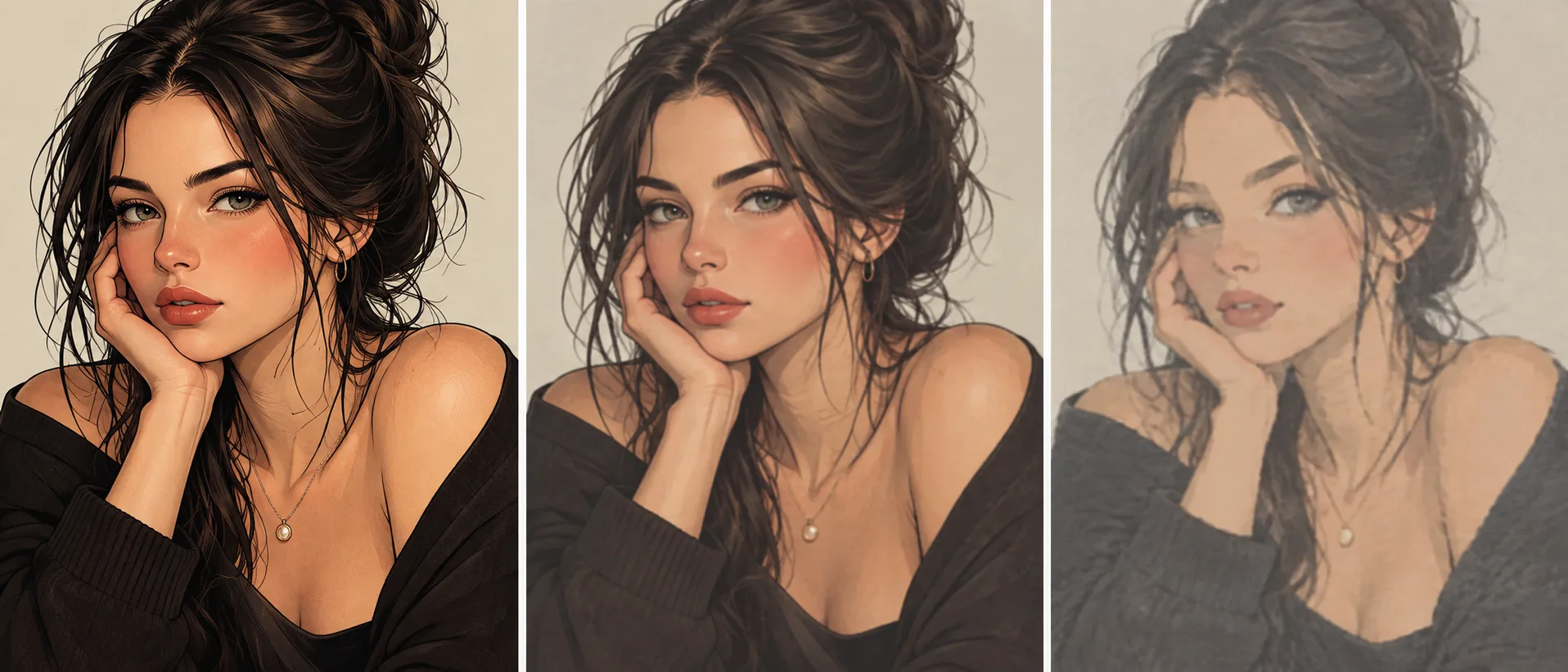
You know the shape of this problem if you have edited anything more than three or four times. The first pass is great. The second is fine. By the sixth the face has quietly changed, the colours have gone flat or oversaturated, and the texture you liked in the original is gone. Nothing broke in an obvious way. It just slid.
Then you try to fix it by writing a longer prompt, and that makes it worse, because you are now asking the model to reconstruct from words something it already has a picture of.
Why it drifts
A diffusion edit is not a patch. The model regenerates the entire image and tries to keep most of it the same, so each pass introduces small deviations across every part of the picture at once. Run that loop repeatedly and the deviations compound. This is generation loss, the same thing that happens when you re-encode a JPEG over and over.
Two things make it worse in practice.
Long prompts accumulate. People tend to keep adding clauses as they iterate, so by pass six the prompt is carrying instructions from passes one through five, some of which now contradict each other.
And some qualities are nearly impossible to write down. You can describe a subject, a pose, a setting. Try describing the exact way colour sits in a hand-painted illustration, or the particular weight of an inked line. Most people end up writing something vague like "soft painterly colours," which the model interprets freshly every time.
The move: reference the properties, not the picture
GPT Image 2.5 takes reference images, and the useful part is that you can tell it which attributes of the reference to carry over rather than asking it to reproduce the whole thing.
So instead of this:
Restore the original colours and line style, soft painterly shading, clean inking, warm palette
You do this:
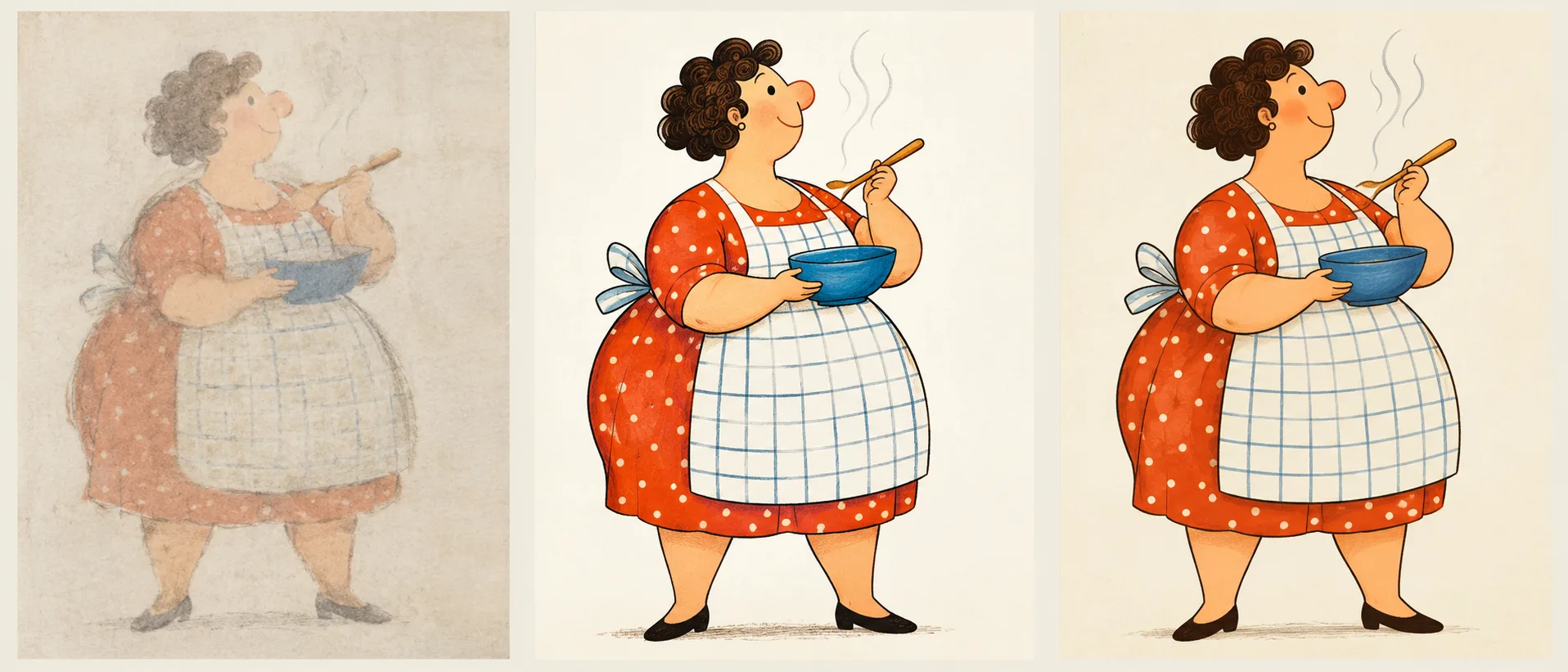
Use image 2 for line style and colour only. Keep the composition, pose and background from image 1.
The second version works better because it never asks the model to translate a visual property into language and back. The reference carries the property directly.
This is the technique @L_ARCH_01 described on X: reference only lines and colour, and a badly degraded image can be pulled most of the way back toward the original look.
When this is the right tool
Reach for it in three situations.
You lost the original in a chat. Starting a new session drops the earlier images out of context. If you saved the file, you can feed it back as a reference instead of trying to describe what you had.
The thing you want back is a texture or a palette. Anything you struggle to name is a good candidate. If you find yourself writing "you know, that kind of grainy warm look," stop writing and attach the image.
You want one property but not the rest. Sometimes the drifted version has better composition and the original had better colour. Partial referencing lets you keep both, which a full "restore the original" instruction cannot do.
It is less useful when the drift is structural. If the pose or the character design has changed substantially, a colour-and-line reference will not put the anatomy back. Start over from the last good version instead.
Writing the instruction
Be explicit about which image is which and what each one contributes. The model follows numbered references reliably when you give them jobs:
Image 1: keep the composition, subject placement and background. Image 2: copy the line weight, colour palette and shading style. Do not copy the subject or background from image 2.
That last sentence matters more than it looks. Without an exclusion, a reference image tends to leak content as well as style, and you end up with bits of the reference's background appearing in your result.
Two other habits help:
Rebuild the prompt from scratch when you start a recovery pass. Do not keep appending to the prompt that produced the drift. Write a fresh, short one describing only what you want now.
And save intermediate versions as you go. The cheapest fix for drift is having a clean version from three passes ago sitting on disk.
Pull a drifted edit back with a reference pass.
GPT Image 2.5 runs here in both text-to-image and image-to-image, with reference input, 1K to 4K output and thirteen aspect ratios. Flare for speed, Sunburst for edit precision, both the same price.
From 5 credits per image · No subscription
Doing this on VidCella
GPT Image 2.5 runs here in both modes, text to image and image to image, so a recovery pass is the same operation as any other edit: attach the reference, write the instruction, generate.
- 1K, 2K and 4K output, thirteen aspect ratios
- Flare and Sunburst tiers, same price, Sunburst is the slower and more precise of the two for editing work
- From 5 credits per image at 1K, pay as you go
For a recovery pass specifically, Sunburst is usually the better pick. Edit precision is the thing it is tuned for, and a recovery is entirely about precision.
FAQs
Why does my image get worse every time I edit it? Each edit regenerates the whole image rather than patching one region, so small changes accumulate across passes. After several rounds those small changes add up to visible drift.
Can I just tell it to restore the original? Not reliably. The model has no memory of the original unless you provide it. Describing it in words means re-deriving a look from language, which is exactly where the detail gets lost.
What can I reference besides line and colour? Composition, lighting, pose, texture, and framing all work. The principle is the same: name the property and say what not to take.
Does this fix a change in the character's face or body? Usually not. Line and colour referencing restores surface qualities. Structural drift needs you to go back to an earlier version.
Which tier should I use for edits? Sunburst, when the edit has to be precise. Flare is faster and costs the same, so it suits quick iterations where you are still exploring.
Related reading
- Why GPT Image 2 blocks your prompts — what happens when an edit is refused rather than degraded
- Making stop-motion with GPT Image 2.5 — the same referencing discipline, applied across frames
- Seedream 5 Pro vs GPT Image 2 — how the earlier model compares on editing work